Make Groovy: A Vintage Bubble Font for Bold, Playful Design
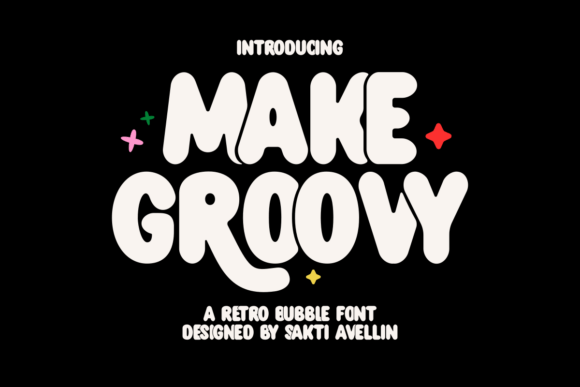
Every now and then a typeface comes along that does more than just spell words—it sets a mood. Make Groovy is that kind of font. It doesn't whisper; it beams. With its rounded, undulating letters and sunny 1970s spirit, this bubble font brings an instant sense of fun and familiarity to any project. Whether you're a designer hunting for a distinctive logo, a small business owner building a brand identity, or a Cricut enthusiast making personalized gifts, Make Groovy offers a blend of nostalgia and adaptability that's hard to match.
At first glance, the font's bold, bouncy shapes recall the carefree energy of retro signage, album covers, and pop culture from the 70s. But this isn't just a throwback—it's a thoughtfully crafted tool designed for modern creative work. In this article, we'll explore what makes Make Groovy unique, where it works best, and how to decide if it's the right choice for your next project.
What Sets Make Groovy Apart from Other Bubble Fonts
Bubble fonts are nothing new, but Make Groovy distinguishes itself with a combination of character and flexibility. The letters are bold and endearing, with an effortlessly wavy silhouette that feels both casual and polished. It's the kind of font that can anchor a t-shirt design or add personality to a coffee shop menu without trying too hard.
One of the most distinctive features is the set of alternate characters. The elongated tail on the letter R, for example, adds a playful flourish that catches the eye. These alternates give you room to customize typography in ways that feel bespoke rather than cookie-cutter. For a brand or logo project, this can be the difference between looking generic and looking memorable.
The font's weight and spacing are also worth noting. Make Groovy isn't overly condensed or stretched—it sits comfortably in layouts, making it readable even when scaled up or used on merchandise. The strokes are thick but not clumsy, and the curves flow naturally, giving text a breezy, affable rhythm.
Character Set and Language Support
Make Groovy includes uppercase and lowercase letters, numerals, punctuation, and a range of accented characters. This makes it suitable for multilingual projects and adds to its practical value. For designers working with international brands or creating content in multiple languages, this kind of support saves time and ensures consistency across materials.
Real-World Applications: Where Make Groovy Works Best
Versatility is one of Make Groovy's strongest suits. While it clearly leans into a retro aesthetic, it adapts to different contexts without feeling forced. Here are some of the most effective use cases, based on hands-on experience and feedback from creators.
Apparel and Screen Printing
Make Groovy was designed with screen printing in mind. Its bold, solid shapes translate beautifully onto fabric, whether you're printing on oversized t-shirts, tote bags, hats, or hoodies. The thick strokes hold up well on textiles, and the rounded edges give designs a soft, approachable look.
For fashion-forward brands targeting teens or young adults, the font's retro charm pairs well with current trends like vintage revival and streetwear. A hoodie with a Make Groovy logo or slogan feels both nostalgic and fresh—exactly the kind of balance that resonates with style-conscious consumers.
Packaging and Labels
Snack labels, hip drink bottles, and teenage skincare products all benefit from the font's lively personality. If you're branding a new line of organic fruit snacks, a craft soda, or a fun face wash for Gen Z, Make Groovy can communicate approachability and energy without shouting.
The font's friendly curves make products feel more accessible, which is especially valuable in competitive retail environments. A package that stands out on a shelf often does so because of its typography, and Make Groovy gives you a head start in that department.
Branding and Logo Design
Businesses that want to project warmth, creativity, or a sense of community can use Make Groovy to establish a visual identity that feels human. Coffee shops, kids' clothing brands, cake shops, and other innovative small businesses have found success with fonts that tell a story—and this one tells a story of joy, connection, and a little bit of retro flair.
For logos, the alternate characters are especially useful. Swapping the standard R for the one with the elongated tail, or using a different stylistic variant, allows you to create a mark that looks custom without commissioning an entirely new typeface. That's a big advantage for entrepreneurs and freelance designers working within budget constraints.
Cricut, Silhouette, and DIY Crafting
Make Groovy is an excellent choice for Cricut and Silhouette users because of its clean outlines and consistent stroke widths. Cutting intricate bubble letters can sometimes be tricky with thin or overly detailed fonts, but Make Groovy's bold shapes cut cleanly on vinyl, cardstock, and heat transfer materials.
Popular DIY projects include custom keychains, mugs, wall hangings, tumblers, and birthday banners. Because the font doesn't rely on fine lines or complex serifs, it works well at small and large sizes alike. A mug with a single word in Make Groovy can look just as polished as a full quote on a wall sign.
Practical Considerations for Designers and Creators
No font is perfect for every situation, and understanding Make Groovy's strengths and limitations will help you use it effectively. Here's a balanced look at what to expect.
Strengths
- High legibility: The bold, rounded shapes are easy to read at a distance, making them ideal for signage, posters, and apparel.
- Distinctive personality: The 70s-inspired undulating shape gives your text a unique character that's hard to replicate with more generic fonts.
- Customizable: Alternate characters allow for personalization, so your designs don't feel recycled.
- Versatile file formats: Typically available in OTF, TTF, and WOFF, the font works across print, web, and cutting machine software.
- Screen printing friendly: Thick strokes and minimal fine details mean clean transfers and fewer registration issues.
Limitations to Keep in Mind
- Not suitable for body text: Like most bubble fonts, Make Groovy is designed for headlines, logos, and short phrases. It's not intended for long paragraphs or small print.
- 70s aesthetic may not suit all brands: While versatile, the font's retro vibe is still a specific look. It works best for brands that want to evoke nostalgia, fun, or approachability. Corporate or luxury brands may find it mismatched.
- Alternate character access: Some users may need to use OpenType-aware software (like Adobe Illustrator, Photoshop, or Affinity Designer) to access the alternates. Basic word processors might not support these features, which can limit customization.
- Spacing considerations: Because the letters are wide and round, kerning and tracking should be adjusted carefully—especially in all-caps settings—to avoid awkward gaps.
File Format Tips
For most design work, an OTF (OpenType) file is recommended because it supports advanced typographic features like alternate characters. TTF works across more platforms, including Windows, while WOFF is the right choice for web use. If you're using Cricut Design Space, both OTF and TTF will work, but check that your software can access alternates through the character map.
Who Benefits Most from Make Groovy?
Based on its features and common applications, the following groups are likely to find the font especially useful:
- Small business owners who want an approachable, retro-inspired brand identity without hiring a professional lettering artist.
- T-shirt and apparel designers looking for a font that prints cleanly and stands out on fabric.
- DIY crafters and hobbyists who enjoy making personalized gifts and home decor with their cutting machines.
- Graphic designers building mood boards, logos, or packaging concepts for clients in food, fashion, or lifestyle industries.
- Marketing teams creating social media graphics, posters, or promotional materials that need a burst of personality.
- Educators and event organizers designing materials for youth programs, summer camps, or community events where a fun tone is appropriate.
How to Evaluate If Make Groovy Is Right for Your Project
Before committing to a font, it helps to ask a few practical questions. Here's a simple checklist you can use:
- What's the tone of my brand or project? If you're aiming for playful, nostalgic, or friendly, Make Groovy is a strong candidate. If your brand is more formal or minimalist, consider whether the retro shapes complement or clash with your message.
- Where will the text appear? For large prints, short headlines, or product labels, the font works beautifully. For long-form content, microtext, or professional documents, look for a standard serif or sans-serif alternative.
- Do I need custom letter variants? If you're designing a logo and want to differentiate it from stock typography, the alternate characters are a clear benefit. Make sure your software supports OpenType features before purchasing.
- How will the font be produced? If you're screen printing, cutting vinyl, or engraving, the bold shapes reduce production issues. If you're printing at small sizes or on textured materials, test the font at the actual size first.
- Does the license cover my use? Always check the license terms. Some fonts have restrictions on commercial use, number of users, or embedding in digital products. Make Groovy typically comes with a standard license for personal and most commercial applications, but confirmation is essential.
Bringing the 70s Spirit into Modern Design
What makes a font lasting rather than gimmicky? Often it's the ability to strike a balance between character and utility. Make Groovy achieves this by rooting its charm in clear design principles: legible forms, adaptable weight, and thoughtful alternates that add value without complexity. It doesn't rely on novelty alone—it works because it's well-made.
The 70s inspiration is unmistakable, but the execution is contemporary. This means you can pair Make Groovy with modern layouts, minimalist backgrounds, or even other typefaces to create contrast. A common approach is to use it for hero text or logos while pairing it with a clean sans-serif for smaller supporting copy. That combination gives you the best of both worlds: eye-catching headlines and readable body text.
Final Thoughts on Make Groovy
Choose Make Groovy when you want your typography to feel welcoming, energetic, and a little bit nostalgic. It's not a font that blends into the background—it's meant to be noticed. And because it's built with real-world applications in mind, from screen printing to Cricut crafting, it offers genuine practical value beyond its good looks.
For designers, business owners, and creators who want to inject a dose of joy into their work, Make Groovy provides a reliable, flexible, and genuinely charming option. Whether you're labeling a snack product, stitching a tote bag, or designing a coffee shop logo, this font helps you communicate not just words, but a feeling—the carefree, vibrant spirit of the 70s, made fresh for today's projects.